AI Metadata Cleaner
AI metadata cleaner to strip container tags & remove EXIF — free, local
Use this free AI metadata cleaner to strip container tags from photos, video, and PDF before you share. Remove EXIF camera tags, GPS, XMP, IPTC, and provenance container markers (including C2PA/JUMBF containers) with an on-device EXIF cleaner — fingerprint protection on by default, free batch + ZIP, no account.

Remove AI & privacy metadata from photos
Files never leave your device. JPEG, PNG, WebP, AVIF, HEIC, Camera RAW · free batch up to 20 + ZIP. RAW decodes locally via libraw → clean JPEG (≤80 MB).
or drag and drop here
HEIC / AVIF / Camera RAW decode locally and export as clean JPEG. RAW uses libraw-wasm in your browser (drops container metadata; does not rewrite proprietary RAW bytes).
Fingerprint protection is on by default: cleaned images get a light pixel-level noise (perceptual hash changes; usually invisible). Uncheck it or choose "Preserve original pixels / quality" for a metadata-only strip when possible.
What
What this AI metadata cleaner removes
This AI metadata cleaner is built to strip container tags you do not want hitchhiking in shared files. Remove EXIF blocks, location GPS, XMP/IPTC fields, generator text, and provenance container containers locally — an EXIF cleaner that never uploads your originals. Creators search for a AI metadata cleaner when they need to strip container tags before social posts, and for an EXIF cleaner when they specifically need to remove EXIF camera tags from phone or DSLR exports.
- Free AI metadata cleaner to strip container tags and remove EXIF in your browser
- AI metadata cleaner for camera tags, GPS, XMP, IPTC, and provenance container containers
- Local-only: strip container tags without uploading originals
- Batch AI metadata cleaner path with ZIP download
- Fingerprint protection default ON when you remove EXIF from photos
- Video + PDF tabs in the same AI metadata cleaner workspace

Includes
What container headers include (and what we strip)
When people search for a AI metadata cleaner or EXIF cleaner, they usually mean camera, location, and provenance container fields. Use this AI metadata cleaner to strip container tags for EXIF camera blocks, GPS coordinates, XMP/IPTC captions, and provenance container / C2PA containers — then download a clean copy. Remove EXIF when you only care about camera tags; strip container tags more broadly when listings need a full strip.

EXIF & camera tags
An EXIF cleaner path removes camera make/model, exposure, software, and timestamps so you can remove EXIF before publishing. Searchers who want an EXIF cleaner land here to remove EXIF without uploading.
GPS / location
Phone photos often embed coordinates. Use this AI metadata cleaner to strip container tags location fields before marketplace or social uploads — remove EXIF GPS in the same pass.
XMP & IPTC
Editorial and creator fields frequently travel in XMP/IPTC. Strip container tags here when those blocks are not meant for public sharing; the AI metadata cleaner keeps the strip local.
provenance container & C2PA containers
Strip provenance container text tags and C2PA/JUMBF containers from the file you hold. This AI metadata cleaner does marker strip only — not SynthID removal or crypto validation — when you strip container tags tied to AI labels.
Why
Why strip container tags locally with an EXIF cleaner

Strip container tags without uploading
This AI metadata cleaner runs in your browser so you can strip container tags and remove EXIF without sending originals to a third-party server. An on-device AI metadata cleaner keeps client catalogs private.
AI metadata cleaner + provenance container in one pass
Use one AI metadata cleaner to remove EXIF camera tags, GPS, XMP/IPTC, and provenance container / C2PA containers from the file you hold — still honest about SynthID limits.
Batch when you need to strip container tags at scale
Photographers and sellers use this AI metadata cleaner to strip container tags across sets, then download a ZIP. Free batch limits apply; no account wall to start.
Fingerprint protection while you remove EXIF
Default image cleaning adds light pixel noise after you remove EXIF / strip container tags, shifting perceptual hashes. Turn it off when you only need a container-only strip.
How
How to strip container tags with this AI metadata cleaner
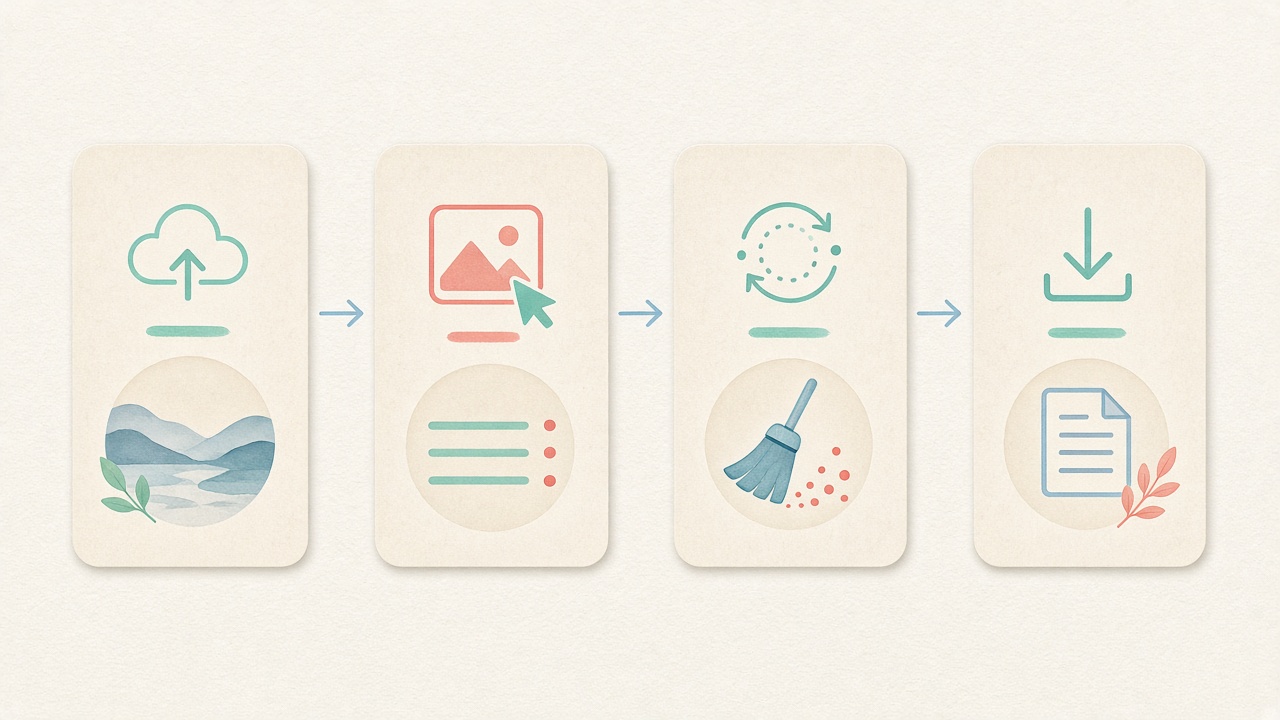
- Step 1
Open the AI metadata cleaner
Stay on this page and use the workspace below. The AI metadata cleaner is ready to strip container tags with no signup.
- Step 2
Choose Images, Video, or PDF
Pick the tab that matches your files. The same AI metadata cleaner can remove EXIF on photos, strip video containers, or clear PDF Info fields.
- Step 3
Drop files and review tags
Drag files in to detect fields locally. Confirm GPS, EXIF, or provenance container markers before you strip container tags.
- Step 4
Clean to remove EXIF / strip container tags
Run clean to remove EXIF and related tags with this AI metadata cleaner, then download files or a ZIP. Fingerprint protection stays on unless you disable it.
Use cases
Who uses a AI metadata cleaner to remove EXIF

Photographers & studios
Deliver client galleries after you strip container tags and remove EXIF. An on-device AI metadata cleaner / AI metadata cleaner keeps studio archives offline while you strip GPS and provenance container markers from publish copies.

Marketplace sellers
Listing photos should not leak home coordinates. Use this AI metadata cleaner to strip container tags and remove EXIF before Etsy or marketplace uploads — still free, still local.

Social & short-form creators
Clean exports before Instagram, TikTok, or X. The AI metadata cleaner helps remove EXIF on stills and strip video container tags on MP4 exports without an account.

AI image publishers
When you need to strip provenance container containers (not SynthID pixels), this AI metadata cleaner can strip container tags markers locally. Pair Detect mode with the AI metadata cleaner path before you publish.

Teams that need a simple AI metadata cleaner
Not everyone wants a desktop suite. This browser AI metadata cleaner / AI metadata cleaner lets teammates remove EXIF and strip container tags on shared machines without installing software.

Privacy-minded travelers
Vacation photos often embed hotel GPS and phone serials. Use this AI metadata cleaner to strip container tags and remove EXIF before you post travel albums or share RAW exports with friends.
Formats
Formats this AI metadata cleaner supports
One AI metadata cleaner workspace for images, video, and PDF. Strip container tags / remove EXIF on JPEG, PNG, WebP, AVIF, and HEIC; decode Camera RAW to a clean JPEG; strip MP4/WebM/MOV containers; clear PDF Info fields. The same EXIF cleaner path helps remove EXIF on photos while the AI metadata cleaner stays local for every tab.

Images
JPEG, PNG, WebP, AVIF, HEIC→JPEG. Use this AI metadata cleaner to remove EXIF and strip container tags in batch with optional fingerprint protection — a built-in EXIF cleaner for everyday photos.
Camera RAW
Local libraw-wasm decode → clean JPEG export. The AI metadata cleaner drops container tags on export; not an in-place RAW rewrite. Strip container tags from the JPEG result after decode.
Video
MP4 / WebM / MOV container strip via local ffmpeg.wasm. Clean video metadata in the same AI metadata cleaner workspace when you need to strip container tags from exports.
PDF
Clear common PDF Info dictionary fields locally — author, title, creator-style tags — with this AI metadata cleaner PDF tab.
Batch + ZIP
Free batch limits: images up to 20, video up to 3, PDF up to 10. A practical batch AI metadata cleaner path so you can strip container tags across a set and ZIP the results.
Detect mode
Inspect EXIF, GPS, provenance container markers, and C2PA containers first if you only need a report before you remove EXIF or strip container tags.
Limits
Honest limits of this AI metadata cleaner
An EXIF cleaner and AI metadata cleaner can strip container tags containers from the file you hold. Remove EXIF and strip container tags here does not rewrite how Instagram, Meta, or marketplaces label AI content, and it cannot remove SynthID-style pixel marks. provenance container container strip is real; invisible watermarks are out of scope.
- This AI metadata cleaner does not remove SynthID or other learned pixel-level watermarks.
- C2PA support is container/marker detect + strip — not full Content Credentials cryptographic validation.
- Removing provenance container does not guarantee platforms will stop labeling content as AI.
- Fingerprint protection changes pixels slightly; turn it off when you need an exact EXIF cleaner / container-only path.
- Fake or unsupported RAW files are rejected; RAW export is clean JPEG, not proprietary RAW rewrite.
Voices
What people say
Illustrative examples for layout — not verified customer reviews. No star ratings.

Maya R.
Product photographer
“I needed GPS gone before client galleries. Local batch + ZIP is exactly what I wanted.”

Jordan K.
Etsy seller
“Phone photos had home coordinates. Cleaning in the browser means I never upload originals to a random site.”

Alex T.
Social designer
“Clear about C2PA containers vs SynthID. I use Detect first, then Clean — no surprise claims.”

Sam L.
Freelance editor
“Fingerprint protection on by default is nice for reverse-image risk; I turn it off when pixels must stay exact.”

Riley P.
Content creator
“Video and PDF in the same local tool means I am not juggling three upload sites for one launch.”

Casey M.
Marketplace ops
“Batch-cleaning GPS before listing photos is now a fixed checklist step. Free limits cover our small team.”
Related
Related guides & tools
- Detect markers
Inspect EXIF, GPS, and C2PA containers on-device.
- What is C2PA?
Content Credentials containers explained honestly.
- What is SynthID?
Why metadata tools cannot remove pixel watermarks.
- Instagram metadata
Privacy before you post.
- Meta AI labels
Metadata vs platform labeling.
- Etsy listing photos
Seller privacy checklist.
Ready to strip container tags with this AI metadata cleaner?
Open the AI metadata cleaner above to strip container tags, remove EXIF, GPS, and provenance container locally with this EXIF cleaner — or Detect first if you only need a report. Free, no account, files stay on your device.
FAQ
AI metadata cleaner FAQ
- What is this AI metadata cleaner and how does it work locally?
- This AI metadata cleaner is a free, browser-based privacy workspace that strips container headers from images, camera RAW files, videos, and PDF documents directly on your device. Instead of uploading your personal or commercial assets to a remote cloud server, our AI metadata cleaner runs HTML5 Canvas, libraw-wasm, ffmpeg.wasm, and pdf-lib inside local browser memory. You can inspect or strip EXIF camera blocks, GPS coordinates, XMP sidecars, IPTC press records, and C2PA JUMBF superboxes with this AI metadata cleaner in seconds.
- How do I strip photo headers using this AI metadata cleaner?
- Scroll to the embedded AI metadata cleaner workspace at the top of this page, keep the Images tab selected, and drop up to twenty JPEG, PNG, WebP, AVIF, HEIC, or RAW files into the queue. Our AI metadata cleaner parses the binary file structure on-device and rebuilds a clean derivative free of IFD0, ExifIFD, GPSInfo, MakerNote, XMP, IPTC, and C2PA blocks. Once the AI metadata cleaner finishes, you can save individual photos or grab a single bundled ZIP archive.
- Does this AI metadata cleaner also work as a camera EXIF and GPS stripper?
- Yes, every pass through our AI metadata cleaner removes standard camera EXIF tags—including body serial numbers, lens models, shutter timestamps, and embedded preview thumbnails—alongside GPS latitude, longitude, altitude, and compass bearing. Photographers and e-commerce sellers rely on this AI metadata cleaner so home studio coordinates never travel inside published product listings. You get complete camera and generative container hygiene from one unified AI metadata cleaner.
- Can I use the AI metadata cleaner without registering an account or paying?
- Yes, the entire AI metadata cleaner workspace is free to use in your browser with no account signup, email wall, watermark, or subscription gate. Your source files stay inside local device RAM while the AI metadata cleaner processes up to 20 images, 3 video clips (up to 100 MB each), or 10 PDF documents per batch. If you have larger studio folders, simply run additional batches in the AI metadata cleaner back to back.
- Which C2PA and generator tags does the AI metadata cleaner remove?
- Our AI metadata cleaner strips JPEG APP11 JUMBF superboxes, PNG caBX/jumb chunks, PNG tEXt/iTXt prompt parameters, WebP XMP/EXIF payloads, and MP4/MOV moov/udta and uuid provenance boxes. However, we keep our AI metadata cleaner boundaries 100% honest: container stripping cannot remove imperceptible pixel or audio watermarks like Google SynthID, nor does this AI metadata cleaner guarantee how third-party social platforms classify or label uploaded media.
- Why choose a local browser AI metadata cleaner over cloud upload websites?
- Cloud strippers require you to transmit unreleased client campaigns, private family albums, or heavy video cuts to someone else's server before returning a file. Running our AI metadata cleaner locally means your originals never cross the network and heavy WebAssembly engines cache once in your browser for instant repeat sessions. Studio teams trust this on-device AI metadata cleaner to protect both confidential creative assets and proprietary prompt workflows.
- How does fingerprint protection work inside the AI metadata cleaner?
- When you clean images in our AI metadata cleaner, an optional fingerprint-protection toggle is enabled by default to add an imperceptible pixel-level noise layer during canvas export. That subtle perturbation shifts both cryptographic file hashes (MD5/SHA-256) and basic perceptual hashes (pHash/dHash/aHash) while the AI metadata cleaner strips all outer container tags. If your workflow requires strict pixel fidelity, simply uncheck the toggle before running the AI metadata cleaner.
- Which image, RAW, video, and document formats does the AI metadata cleaner support?
- In the Images tab, the AI metadata cleaner handles JPEG, PNG, WebP, AVIF, and HEIC files plus Camera RAW formats (DNG, CR2, NEF, ARW up to 80 MB) decoded locally to clean JPEGs. In the Video and PDF tabs, the same AI metadata cleaner remuxes MP4, MOV, and WebM clips (up to 100 MB each) via lossless ffmpeg.wasm stream copy and clears PDF /Info dictionary fields. You can also switch to Detect mode at any time to verify your files after running the AI metadata cleaner.
Disclaimer: This AI metadata cleaner cannot remove SynthID or invisible learned watermarks, and does not guarantee how platforms label AI content. Default image cleaning includes light fingerprint protection (pixel noise); you can turn it off. C2PA work is container/marker detect + strip, not cryptographic validation. Processing stays on your device.